This section helps you export device-based reports from Testpress to understand how learners access your platform. The report provides insights into whether users are accessing the LMS via PC, mobile browser, or mobile app, helping you optimize user experience and platform performance.
Why Use Device-Based Reports?
Understand how learners access your LMS
Identify mobile vs desktop usage trends
Optimize content and platform experience
Support data-driven decisions for app and web improvements
How to Export Device-Based Reports
Log in to your Testpress Admin Dashboard, Navigate to Members.
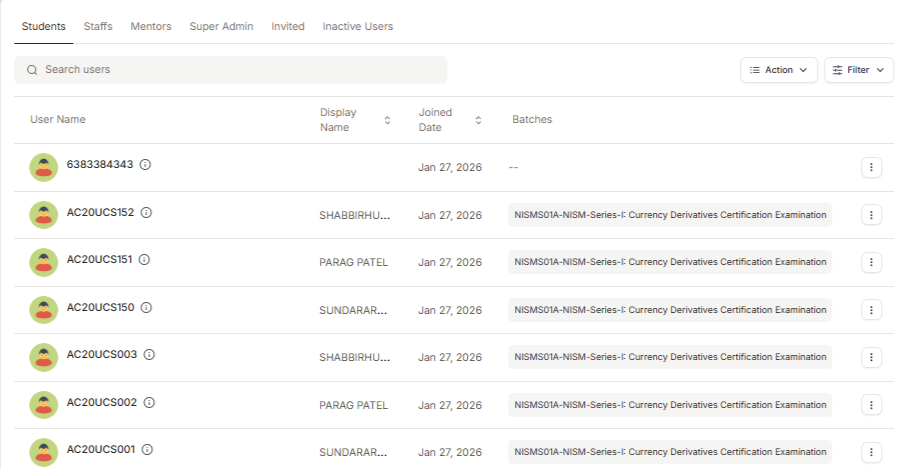
Click on Actions and Select Export Device-Based Reports.
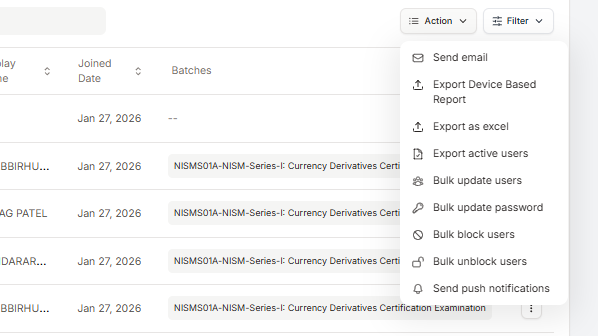
The report will be generated and sent to the registered admin email ID.
What Does the Device-Based Report Include?
The device-based report includes details of the device used by users, such as:
PC
Mobile (Browser)
Mobile App
Was this article helpful?
That’s Great!
Thank you for your feedback
Sorry! We couldn't be helpful
Thank you for your feedback
Feedback sent
We appreciate your effort and will try to fix the article