AI Doubt Queries
This section explains how admins can view and manage learner doubt queries submitted through the Doubt Query feature.
Accessing Queries
Log in to your admin panel.
Click Queries from the top menu.

You will see a list of all learner doubts raised on the platform.
Dashboard Overview
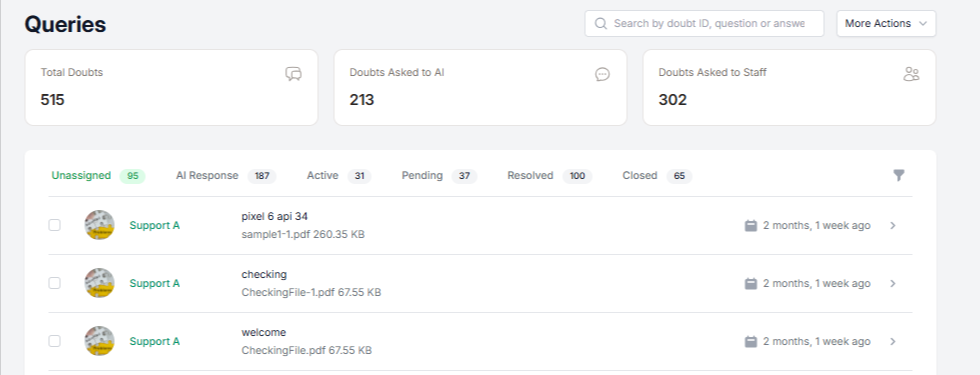
The dashboard shows a summary of all queries:
Total Doubts – Total number of queries raised
Doubts Asked to AI – Queries answered by AI
Doubts Asked to Staff – Queries sent to support staff
Query Status Tabs
Queries are grouped by status for easy tracking:
Unassigned – Queries not yet assigned
AI Response – Queries answered by AI
Active – Queries currently in progress
Pending – Waiting for action or response
Resolved – Queries marked as resolved
Closed – Completed queries
Click any tab to view queries under that status.
Viewing Query Details
Each query displays:
Learner name
Query text
Attached files (if any)
Time since submission
Click a query to view full details and manage its status.
Reports and Export
From the Queries section, admins can:
View topic-wise reports
Track doubt resolution trends
Export doubt data as Excel for reporting or analysis

With everything organized in one view, handling learner doubts becomes quick and manageable.
Was this article helpful?
That’s Great!
Thank you for your feedback
Sorry! We couldn't be helpful
Thank you for your feedback
Feedback sent
We appreciate your effort and will try to fix the article