This feature allows admins to control how users are verified when they sign up or log in to the Testpress LMS. You can choose the verification method based on your institute’s security and onboarding requirements.
How to Set a Verification Method
Log in to your Testpress Admin Dashboard.
Navigate to Settings.
Click on Institute.

Scroll to the Verification Method section.
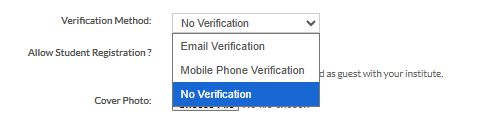
Select your preferred verification option.
Save the changes.
Available Verification Options
Email Verification
Users must verify their account using an email link.Mobile Verification
Users must verify their account using an OTP sent to their mobile number.No Verification
Users can access the platform without email or mobile verification.
Why Configure Verification Method?
Control user access and platform security
Reduce fake or invalid registrations
Simplify onboarding when strict verification is not required
Choose verification based on your learner base and use case
Was this article helpful?
That’s Great!
Thank you for your feedback
Sorry! We couldn't be helpful
Thank you for your feedback
Feedback sent
We appreciate your effort and will try to fix the article